






Full View
Samanlaisia kohteita
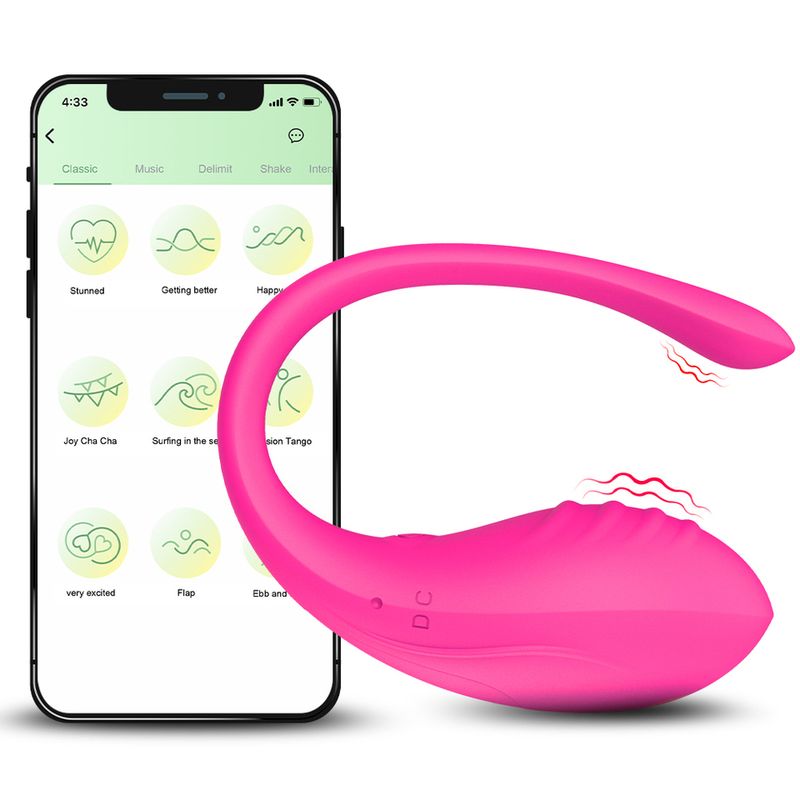
Wearable Dildo Vibrating Egg 9 Modes APP Remote Control Vaginal Massage Clit Stimulator Vibrator Female Sex Toys For Adults
110 myyty
( 0 Arvostelut )
€14.35€19.31
Väri : Vaaleanpunainen
Määrä :
 Customer Service
Raportoi
Sisällytä tekijänoikeusrikkomusIlmainen vakiotoimitus. Katso yksityiskohdat
Arvioitu välillä Sun, Sep 7 ja Fri, Sep 12
Voit palauttaa tuotteen 30 päivän kuluessa vastaanottamisesta. Katso yksityiskohdat
Osta luottavaisin mielin

Rahat takaisin -takuu
Saat tilaamasi tuotteen tai rahasi takaisin. Lue lisää
About this item
Seller assumes all responsibility for this listing.Tuotenumero: 29748050
Item specifics
Item description from the seller
Package List,1 x Vibrator Love Egg,1 x USB Charging Cable,App Name: Love Spouse,APP Control Function,① Classic mode: 9 vibration frequency.,② Music mode: You can play music while using the toys. The vibration frequency will be changed by the music melody.,③ Shake mode: By shaking your phone to control the vibration frequency and intensity .,④ Interactive mode: Add friends to control each others vibrators and can make video calls. Will make more fun!,App Connection Guide,Ios System
①Search for"Love Spouse" in the App Store, download and install.
②Scan the QR code with your mobile phone and follow the instructions to download and install"Love Spouse" APP.
Android System
③Search for "Love Spouse" in the Google Play,download and install.
④Scan the QR code with your mobile phone and follow the instructions to download and install"Love Spouse" APP.
Device Connection And Control
①Make sure Bluetooth is turned on.
② Open the "Love Spouse" APP
③There are "Visitors login" and "New user" two modes login in.If you want to experience more operation modes,select "New user", follow the instructions complete the registration.
New User
①Click "+", the device binding scan box will appear.
② Scan the QR code below Or enter the equipment code "0887",the device must be turned on when binding the device.
Partner Control
① Ask your partner to download “Love Spouse "and register.
② Click my device,choose the last mode: Interactive mode, add and search your partner as friend,then ask him to accept it.
③ Click my device,choose Interactive mode,invite your partner to control the service.


Videot
Videos for this product

 4.3 viidestä 6,260 arvostelun perusteella